


Your maps in the cloud?
Create and share in few easy steps!
Do you want to create an effective multi-layer map, enriched with multimedia?
Do you want to present to your client with an orthophotomap or DSM model?
Do you want to transfer large GeoTIFF, DXF files but don't know how to do it?
geoMap.link will give you such an opportunity! This application is for you!
Create a map, generate a sharable link and pass it to the customer. After clicking on the link, your customer be able to view, analyze and work on the map using a map viewer.
GeoMap.link system will record when your client have seen the map and also how many times he viewed it!
SEE DEMO MAPS
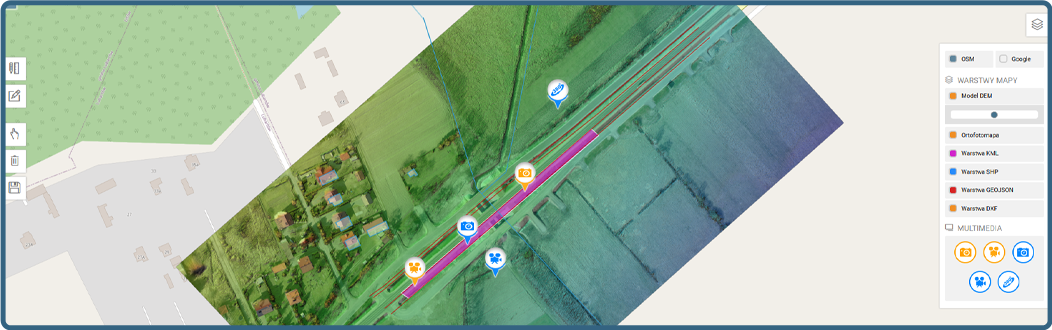
Below we present a demo of what your map might look like thanks to geoMap.link.Create such a map in few easy steps and share it with your client even faster than you think!
WHY GEOMAP.link?

Security is always
our priority!
This is the highest priority for us!

Availability of the cloud service at the level of 99.9% guaranteed!
Share data quickly and securely!

Fast technical support
chat / e-mail
We will help you solve your problems!
...YOUR DATA IN A SAFE CLOUD...
APPLICATION FUNCTIONS
Multi-layer maps
17 kinds of layers!
Import georeferencing files
Add GeoTIFF, DXF, SHAPE, KML, GEOJSON
Import media
Upload photos, videos and 360° panoramas
Map sharing
Share the map with a special link!
Read register
You know what and when!
Draw on the map
The ability to draw polygons and lines!
GeoTiff and TilesMap
All you need!
Mobile maps
Maps available from mobile devices!
DSM / DEM models
Browse the map on OSM
100% resolution
Browse at Zooming
NMT / NMTP models
Browse the map on OSM
Upload up to 15GB
Send the map in a zip file!
Projects without limits
Create as many projects as you need!
Organize maps
Each map has its place in the project!
Import in ZIP
Data import in ZIP file!
they are already testing



CHOOSE A PLAN
All plans come with a 14 day trial.No credit card required. You can unsubscribe at any time.



Find out more
Create multi-layer maps with no limit. See a sample DEMO map that you can create using geoMap.link. SEE DEMO
Import popular georeferencing files such as GeoTIFF, DXF, SHAPE, KML, GEOJSON and create map layers.
Depending on the plan you choose, you have 15GB, 50GB or 300GB available disk space. Each plan has a flexible disk space with no limit, after exceeding the limit, we will add additional megabytes to your account above the plan you have chosen.
Create multi-layer maps based on OSM. We support 14 different files that can be used to make up the layers (GeoTIFF, DXF, SHAPE, KML, GEOJSON, Photo, Video, Panorama 360, Map Tiles).
Import orthophotomaps and DEM / DSM models in GeoTiff and TilesMap format for Google into the geoMap.link application. The application is compatible with any photogrammetry software that supports this file format.
In the administration Panel you be able to track any activity of the links that you share with your clients including date of display, IP address, type of browser and also if the map has been displayed or not.
The geoMap.link system allows you to draw polygons and lines on created maps. Drawings can be created by the creator of the map and the person to whom you share the map. Drawings can be saved and additionally exported to KML file.
Share multi-layer maps or just selected layer of the map with no limits. Created links can be password protected. Additionally all maps can be branded with your logo.
Enrich your maps with additional multi-media, such as photos, videos and 360 ° panoramas. If the file has geotags, they will be automatically downloaded from your file and we will create a marker on its basis.
There is no such a thing. We know that your maps have tens of thousands of files therefore we made sure that there are no quantitative limits. You upload as much as you want!
Does your ortophotomap is in a geoTiff / big tiff / JPG / PNG file? Do you want to present it in the maximum resolution? No problem, we have created a zooming viewer that will display your orthophotomap in an excellent quality at very smooth magnification. Zip the file and upload it to the cloud. geoMap.link will convert the file into a tiled form and present it in the Zooming browser!
We have developed a system for uploading files to our cloud using a ZIP compressed file that can weigh up to 15 GB. Thanks to this, sending takes up to 30x faster. You just upload one file. Our system will take care of unpacking the file and connecting it as a layer under OSM or converting it to a tile map for the Zooming browser.
By uploading an orthophotomap or a dsm model, you send it to us as a package of TilesMap files for google (export from photogrammetric programs, e.g. Agisoft, Pix4D). Our system will automatically unpack it and connect it as a layer on the OSM.
Your maps are accessible from anywhere in the world with internet access. Our application is adapted to mobile devices.